Demo · 2 min
Press a key, get a Trello card with the page, mail or file you're looking at already in it.
That's the whole app. Recorded on my own Mac, no cuts, sound on.
 Kaartje say: car‑tyuh
quick entry for Trello on the Mac
Kaartje say: car‑tyuh
quick entry for Trello on the Mac
 Sulejman
Launching soon
Boring mode
Sulejman
Launching soon
Boring mode
It's a board: drag it sideways, click a card to open it
That's the whole app. Recorded on my own Mac, no cuts, sound on.
I use Trello for everything, and getting stuff into it was always the annoying part: switch to Trello, find the board, new card, paste the link, switch back. Trello's own desktop app has a quick add window, but it only takes a title and you still type everything yourself. So I built the version I wanted.
Kaartje is Dutch for "little card".
I'm finishing notarization and licences. The first 50 people who email me get a free licence, for good, in exchange for honest feedback, especially about which apps the autofill should support that it doesn't yet.
Email me for a free licencePress ⌃⌥Space in any app (change it if you like). The card comes up with:
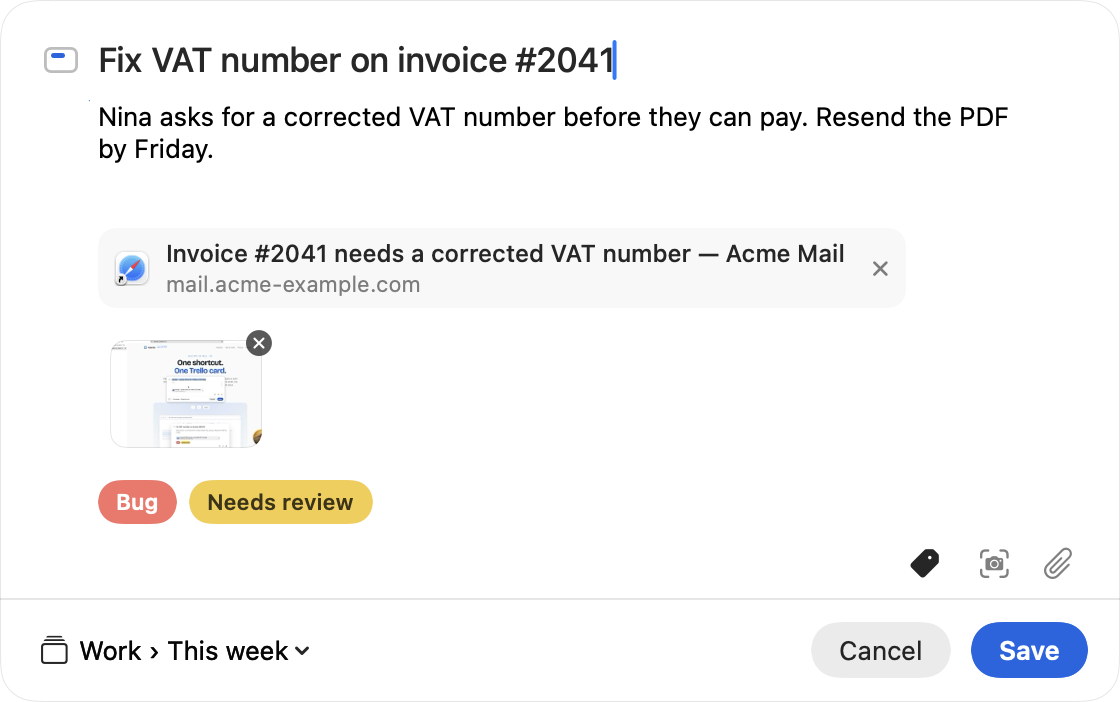
The grey chip is the link it captured; click × if you don't want it on the card. The labels are your board's own labels.
⌘⇧S hides the panel, you pick an area or a window, and it lands on the card. ⌘V an image, or drop files onto the panel.
Pick board and list in the panel. Set a default. Kaartje remembers the labels you used last time on each board.
Menu bar only, no Dock icon. Return saves, Esc cancels, and you're back where you were.
It's for getting things onto a board fast, not for managing the board. Trello is good at that part.
Mac only, macOS 14 or later. Apple silicon and Intel.
Firefox doesn't tell other apps which tab is open, so there you get the text you selected and nothing else.
About 4 MB. Starts instantly, sits in the menu bar, uses next to nothing.
No account, no server, no analytics. Your Trello token lives in the macOS Keychain. The long version.
macOS asks for Automation (to read the current tab or message), Accessibility (only for selected text) and Screen Recording (only for screenshots). Say no to any of them and the rest still works.
All the Macs you use, updates included. 14-day trial. 30-day refund by email, no questions.
Soon. Email me and you'll hear first, with a launch discount if the 50 free spots are gone.
No. Kaartje talks to Trello directly. You sign in with your Trello account once.
The link goes at the bottom of the card description, so it's clickable in Trello. Screenshots and files become attachments. Labels are your board's existing labels; nothing new is created.
Yes, in Settings. Anything you like.
Yes. Attachments follow Trello's limits: 10 MB per file on free workspaces.
I wrote up all six ways to add a card from a Mac, with what each one fills in for you. Read the guide.
So macOS opens it without a fight.